Getting started
Create your account and start your plan
Enter three essential details, choose your support, and finish secure checkout.
Before you start
Have your full name, an email inbox you can access, and your website’s public HTTPS address ready. Use the main website address, for example https://example.com, rather than a contact-page URL. If another person will install ADA Real, you can complete signup first and share the installation instructions afterward.
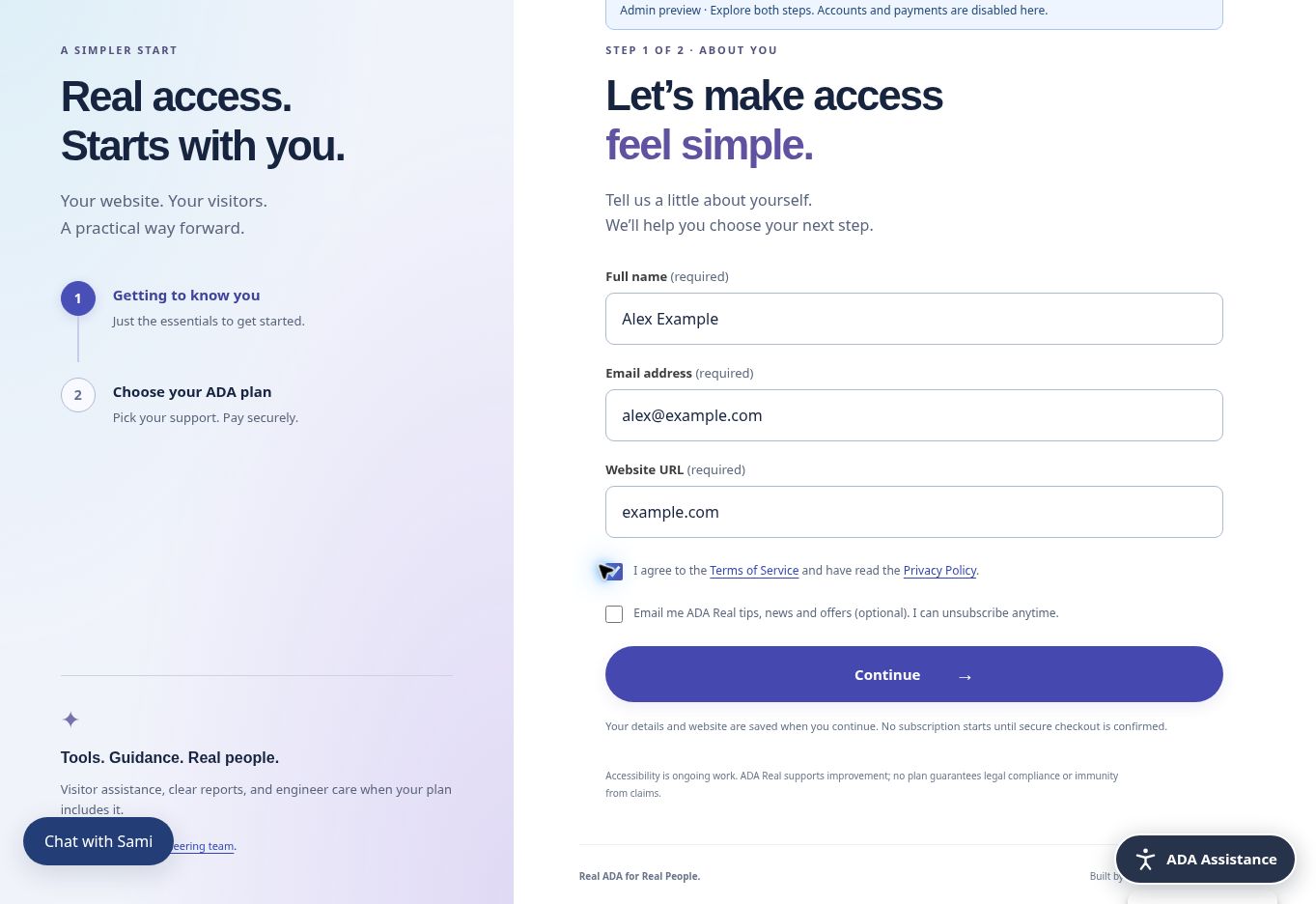
Step 1 — save your details
- Select Get ADA Real or Get started on the website.
- Enter your full name, email address, and public website address. Check spelling carefully.
- Read and accept the Terms of Service and acknowledge the Privacy Policy. The marketing email checkbox is optional.
- Select Continue. Your details and website are saved now, even if you leave before selecting a plan or paying.
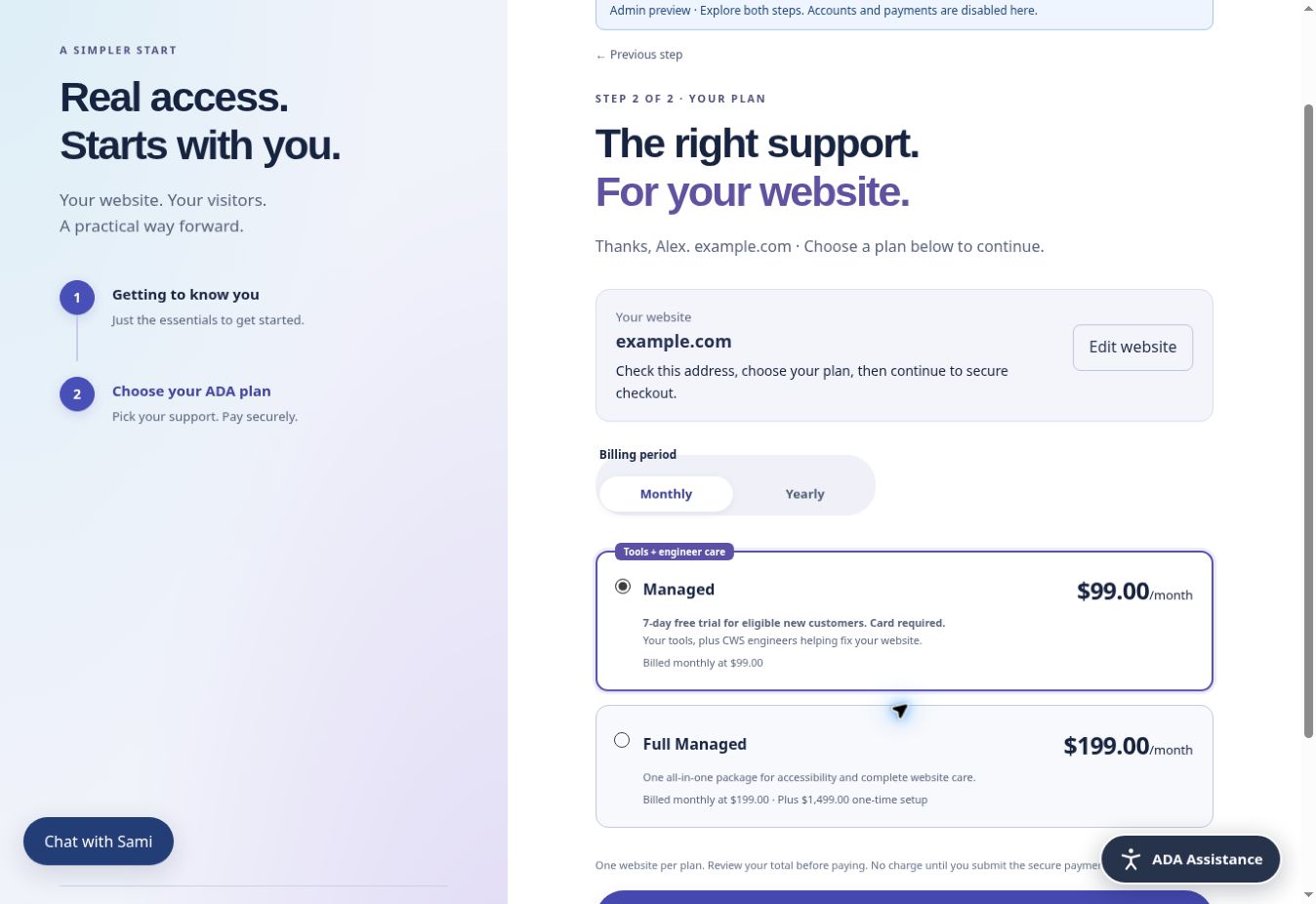
Step 2 — choose your plan
Compare the available plans and choose monthly or yearly billing. Review the website address displayed above the choices. If it is wrong, select Edit website before continuing. Monthly and yearly prices are separate offers: selecting yearly billing means one yearly payment at the yearly amount shown, rather than twelve monthly charges. See Choose a plan and billing period.
Step 3 — review and authorize checkout
Read the total due today and the recurring amount. Eligible Managed customers see a seven-day trial with $0 subscription charge today; a card is still required. Other checkouts charge the quoted total, including any setup fee shown. Select the recurring-billing consent checkbox, then open the secure payment form. Enter payment details in Stripe’s secure form, not in chat or the contact form.
Step 4 — enter your dashboard
After Stripe and ADAR confirm your subscription or eligible trial, ADAR advances automatically. If requested, choose and confirm a password of at least 12 characters. You will then see your dashboard and welcome message. A completed signup receives a confirmation email; a trial includes a zero-dollar PDF, and successful charges receive invoice PDFs.
If anything interrupts you
Return with the same email. You may be asked to verify with an emailed code before your saved checkout resumes. If checkout is confirming, allow it to finish and do not submit another payment. See Checkout did not finish for a safe recovery path.
Screenshots and guided walkthroughs
These materials use the public demonstration or a safe admin preview. Sample details, screen layouts, and displayed prices can differ from your own account. Your live checkout quote and confirmation control your subscription.
Read the video transcript
0–10 seconds: Monthly billing is selected. Managed costs $99 per month. Full Managed costs $199 per month plus a $1,499 one-time setup fee.
10–20 seconds: Yearly billing is selected. Managed costs $999 per year. Full Managed costs $1,999 per year plus the $1,499 one-time setup fee.
To begin, enter your name, email, and website, review the Terms and Privacy Policy, then choose your plan and interval. Review the exact recurring authorization before secure checkout. Eligible Managed customers receive a seven-day trial with $0 subscription charge today; a card is required and automatic billing begins after the trial unless canceled beforehand.