Website management
Recognize the Hub and loading states
Understand the branded launcher, lightweight logos, and device-specific Hub appearance.
Recognize ADA Real
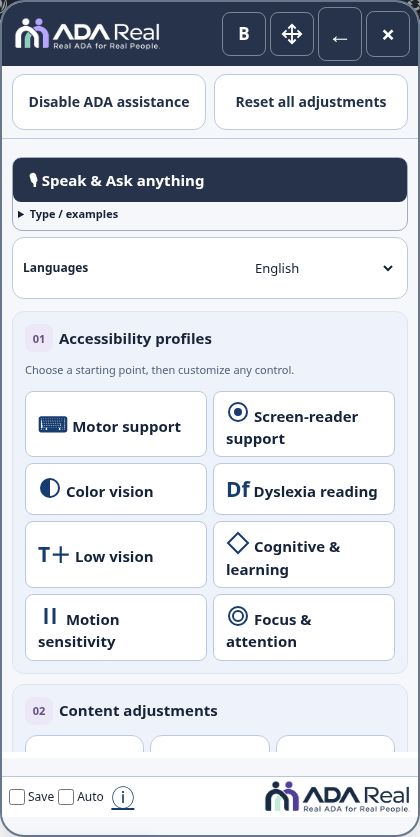
The blue launcher uses the familiar accessibility icon and the wording Accessibility · by ADA Real. The Hub header and footer use transparent ADA Real logos, with light lettering for dark backgrounds and dark lettering for light backgrounds. The logos link to ADA Real in a new tab.
Keep the Hub compact
Save, Auto, and ⓘ sit together in a short footer. Audio Reader starts collapsed. The default Hub text is regular, with clearer button labels and icons; B selects bold and R returns to regular. Move or slide the Hub aside if it covers content.
Loading and reactivation
The launcher progress indicator shows preparation, including after reactivating assistance from original-site mode. Processing and connection time vary with the website and document. If a page appears stuck, save work, refresh safely, and follow the connection guide.
Website changes and caches
Updated logo assets use small transparent image files. Website caches or older open tabs can retain an older appearance. Refresh after an update and confirm the actual public website before changing unrelated theme settings.
Screenshots and guided walkthroughs
These materials use the public demonstration or a safe admin preview. Sample details, screen layouts, and displayed prices can differ from your own account. Your live checkout quote and confirmation control your subscription.