Visitor tools
Open and use visitor assistance
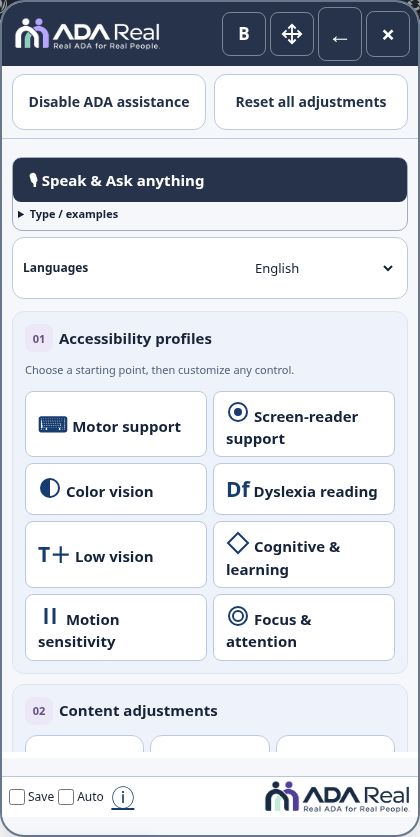
Open the Accessibility Hub, choose assistance, and return to the original website whenever you need to.
Open the Hub
Choose the blue Accessibility · by ADA Real launcher. Keyboard users can reach it with Tab and open it with Enter or Space, or use Alt+Shift+A where the shortcut is available. A progress indicator on the launcher shows when assistance is preparing. The website remains familiar: optional display changes are applied when a visitor selects them.
Choose a starting point
Profiles offer starting preferences for motor support, screen-reader support, color vision, dyslexia reading, low vision, cognitive and learning needs, motion sensitivity, and focus and attention. You can also change individual text, color, pointer, focus, and reading controls. See Accessibility profiles.
Speak, navigate, or read
Speak & Ask anything accepts supported accessibility commands and requests to open public website pages or products. It is different from the Sami sales/support assistant on ADA Real. Languages changes available language choices. Audio Reader starts collapsed and never plays until requested.
Close, reset, and disable are different
- Close × hides the Hub. The launcher remains available.
- Reset all adjustments returns optional visitor preferences to their defaults.
- Disable ADA assistance reloads the original website for this browser, including its original image and PDF behavior. The launcher remains so you can reactivate assistance.
Save form work before a reload. These visitor actions do not change the website subscription or other visitors’ choices.
Footer and help
Save remembers choices on this device. Auto controls automatic opening. The ⓘ button opens information; use [X] Close or Escape to close it. Header and footer ADA Real logos open the ADA Real website in another tab. A website owner or ADAR administrator may hide some controls.
Screenshots and guided walkthroughs
These materials use the public demonstration or a safe admin preview. Sample details, screen layouts, and displayed prices can differ from your own account. Your live checkout quote and confirmation control your subscription.